Ready to send WhatsApp marketing messages?Take the 2-minute survey →
Features — Inbox

WhatsApp inbox:
reply to customers who write back.

A campaign goes out and people answer it. Others write to your number on their own, with a question or a photo. Every message that reaches your WhatsApp numbers lands in the Inbox, and your team answers it from there.

Every message, one place

Everyone who writes,
in one list.

The Inbox is where customers' messages to your WhatsApp numbers arrive — replies to a campaign, and everything else they send. Search by name or number, narrow the list to one of your numbers, and see at a glance what hasn't been read: unread conversations carry a red dot, and the Inbox item in the menu shows how many are waiting.
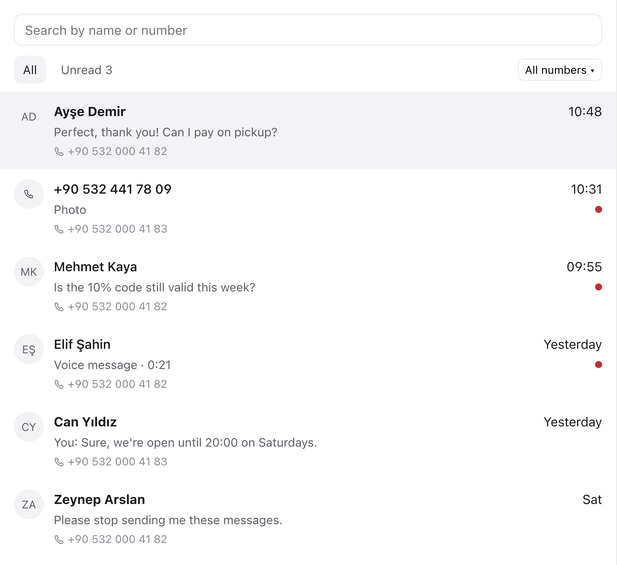
Rapio's Inbox: the conversation list with search, the All, Unread and number filters, and a red dot on unread conversations
Not just campaign replies

Anything a customer sends to one of your numbers lands here, whether or not it answers a campaign. Each conversation shows the number it came in on.

Unread, counted

A red count next to Inbox in the menu tells you how many conversations have something new. Open one and it's marked as read.

The campaign in the thread

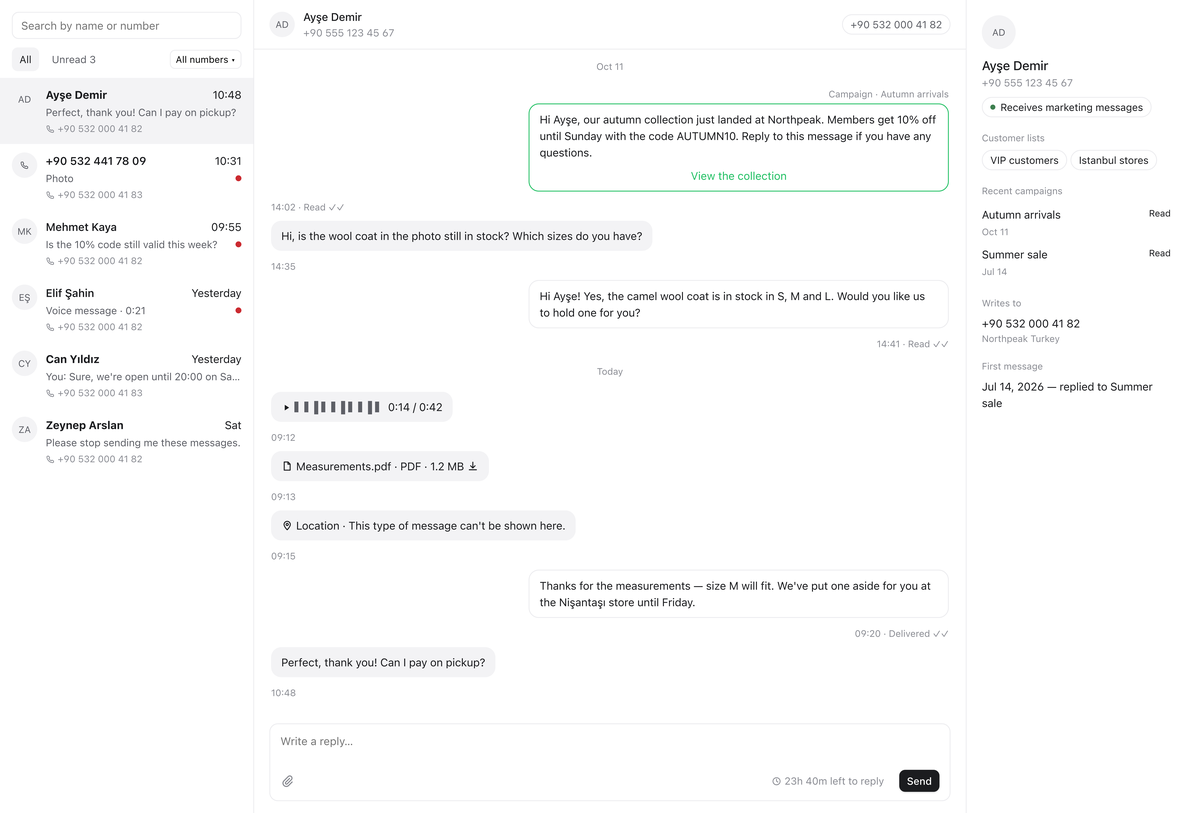
When someone answers a campaign, the campaign message sits in the conversation above their reply, so you can see what they're responding to.
Reply in the window

Answer with text and files,
while the window is open.

When a customer writes, WhatsApp opens a 24-hour window for your reply, and each new message from them starts it again. Inside it you answer in your own words, with photos, videos, audio and documents. The reply box shows how much time is left; once the window closes, replies pause until the customer writes again.

A conversation in Rapio's Inbox: the customer's voice message and PDF, the team's replies with their delivery status, the reply box with the time left in the 24-hour window, and the contact panel
Files both ways

Photos, voice messages, videos and documents from customers open in the conversation. A reply can carry up to 10 files, and each one is checked against WhatsApp's limits before it goes.

Seen on their side

Opening a conversation marks the customer's message as read in WhatsApp, so they know someone has it.

Outside your plan

Replies you send from the Inbox never count toward your plan's messages. What Meta charges for them is on the pricing page.

Know who's writing

Who they are,
next to what they said.

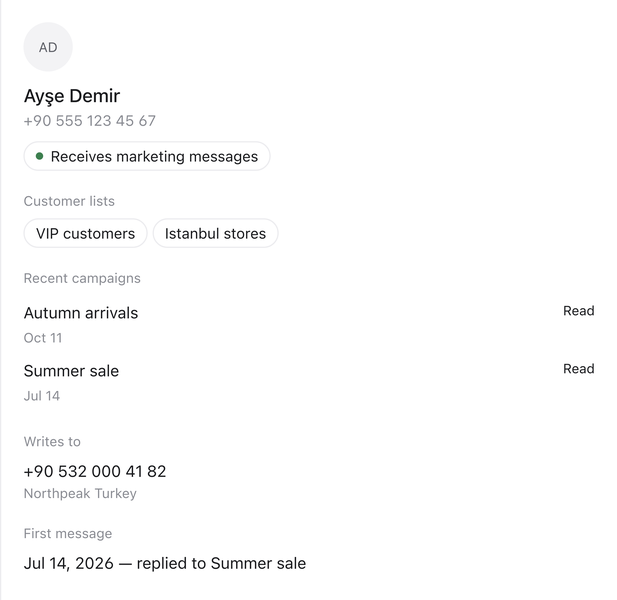
Beside every conversation, the contact panel shows who you're talking to: the customer lists they're in, the campaigns you sent them recently and how each one landed, the number they wrote to, and when they first got in touch. If someone has opted out of marketing messages, the panel says so — and you can still answer them while the window is open.

The contact panel in Rapio's Inbox: the customer's lists, recent campaigns with how each landed, the number they wrote to and their first message
The whole team, every conversation

Everyone in your workspace sees every conversation and can reply to any of them.

Names from your lists

The name on a conversation comes from your customer lists in Audiences, not from the customer's WhatsApp profile.

Kept with your workspace

Messages and the files in them are kept for as long as your workspace exists.

Answer the people
who answer you.

Every message to your numbers, in one place, with your whole team on it.